
- Introduction to web services
- Web services interview questions
- SOAP web service introduction
- RESTful web service introduction
- Difference between SOAP and REST web services
- SOAP web service example in java using eclipse
- JAX-WS web service eclipse tutorial
- JAX-WS web service deployment on tomcat
- Create RESTful web service in java(JAX-RS) using jersey
- RESTful web service JAXRS
- json example using jersey
- RESTful web service
- JAXRS CRUD example using jersey
- AngularJS RESTful web service
- JAXRS CRUD example using $http
- RESTful Web Services (JAX-RS) @QueryParam Example
- Spring Rest simple example
- Spring Rest json example
- Spring Rest xml example
- Spring Rest CRUD example
We have already seen Restful web services tutorial and Spring mvc web example. In this post, we will see combination of both.
1) Create a dynamic web project using maven in eclipse.
2) Now change pom.xml as follows:
pom.xml
 <project xmlns="http://maven.apache.org/POM/4.0.0" xmlns:xsi="http://www.w3.org/2001/XMLSchema-instance"
  xsi:schemaLocation="http://maven.apache.org/POM/4.0.0 http://maven.apache.org/maven-v4_0_0.xsd">
  <modelVersion>4.0.0</modelVersion>
  <groupId>com.arpit.java2blog</groupId>
  <artifactId>SpringRestfulWebServicesExample</artifactId>
  <packaging>war</packaging>
  <version>0.0.1-SNAPSHOT</version>
  <name>SpringRestfulWebServicesExample Maven Webapp</name>
  <url>http://maven.apache.org</url>
  <dependencies>
    <dependency>
      <groupId>junit</groupId>
      <artifactId>junit</artifactId>
      <version>3.8.1</version>
      <scope>test</scope>
    </dependency>
    <dependency>
   <groupId>javax.servlet</groupId>
   <artifactId>javax.servlet-api</artifactId>
   <version>3.1.0</version>
  </dependency>

  <dependency>
   <groupId>org.springframework</groupId>
   <artifactId>spring-core</artifactId>
   <version>${spring.version}</version>
  </dependency>
  <dependency>
   <groupId>org.springframework</groupId>
   <artifactId>spring-webmvc</artifactId>
   <version>${spring.version}</version>
  </dependency>
 </dependencies>
 <build>
  <finalName>SpringRestfulHelloWorldExample</finalName>

  <plugins>
   <plugin>
    <groupId>org.apache.maven.plugins</groupId>
    <artifactId>maven-compiler-plugin</artifactId>
    <version>3.1</version>
    <configuration>
     <source>${jdk.version}</source>
     <target>${jdk.version}</target>
    </configuration>
   </plugin>
  </plugins>

 </build>
 <properties>
  <spring.version>4.2.1.RELEASE</spring.version>
  <jdk.version>1.7</jdk.version>
 </properties>

</project>
Spring application configuration:
3) Change web.xml as below:
<!DOCTYPE web-app PUBLIC
 "-//Sun Microsystems, Inc.//DTD Web Application 2.3//EN"
 "http://java.sun.com/dtd/web-app_2_3.dtd" >

<web-app>
  <display-name>Archetype Created Web Application</display-name>
  <servlet>
 <servlet-name>springrest</servlet-name>
 <servlet-class>
  org.springframework.web.servlet.DispatcherServlet
 </servlet-class>
 <load-on-startup>1</load-on-startup>
</servlet>

<servlet-mapping>
 <servlet-name>springrest</servlet-name>
 <url-pattern>/</url-pattern>
</servlet-mapping>
</web-app>
4) create a xml file named springrest-servlet.xml in /WEB-INF/ folder.
Please change context:component-scan if you want to use different package for spring to search for controller.Please refer to spring mvc hello world example for more understanding.
<beans xmlns="http://www.springframework.org/schema/beans"
 xmlns:context="http://www.springframework.org/schema/context"
 xmlns:mvc="http://www.springframework.org/schema/mvc" xmlns:xsi="http://www.w3.org/2001/XMLSchema-instance"
 xsi:schemaLocation=" http://www.springframework.org/schema/beans http://www.springframework.org/schema/beans/spring-beans-3.0.xsd http://www.springframework.org/schema/context
        http://www.springframework.org/schema/context/spring-context-3.0.xsd http://www.springframework.org/schema/mvc http://www.springframework.org/schema/mvc/spring-mvc-3.0.xsd">

 <mvc:annotation-driven/>
<context:component-scan base-package="org.arpit.java2blog.controller" />

</beans>
Create controller
5) Create a controller named “SpringRestController.java”
package org.arpit.java2blog.controller;
import org.springframework.web.bind.annotation.PathVariable;
import org.springframework.web.bind.annotation.RequestMapping;
import org.springframework.web.bind.annotation.RequestMethod;
import org.springframework.web.bind.annotation.RestController;

@RestController
@RequestMapping("/hello")
public class SpringRestController {
    @RequestMapping(value = "/{name}", method = RequestMethod.GET)
    public String hello(@PathVariable String name) {
        String result="Hello "+name;
        return result;
    }
}
@PathVariable: Used to inject values from the URL into a method parameter.This way you inject name in hello method .
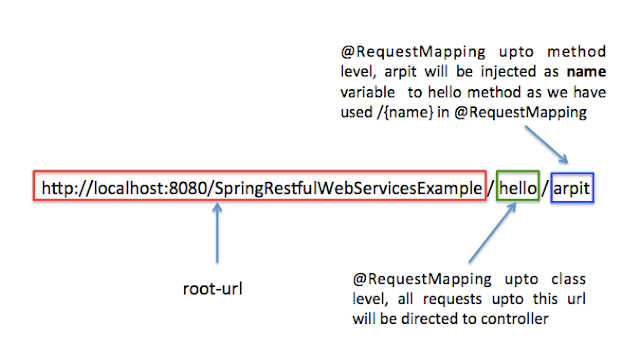
We are not providing any view information in springrest-servlet.xml as we do in Spring MVC. If we need to directly get resource from controller, we need to return @ResponseBody as per Spring 3 but with Spring 4, we can use @RestController for that.
In spring 4.0, we can use @RestController which is combination of @Controller + @ResponseBody.
@RestController = @Controller + @ResponseBody
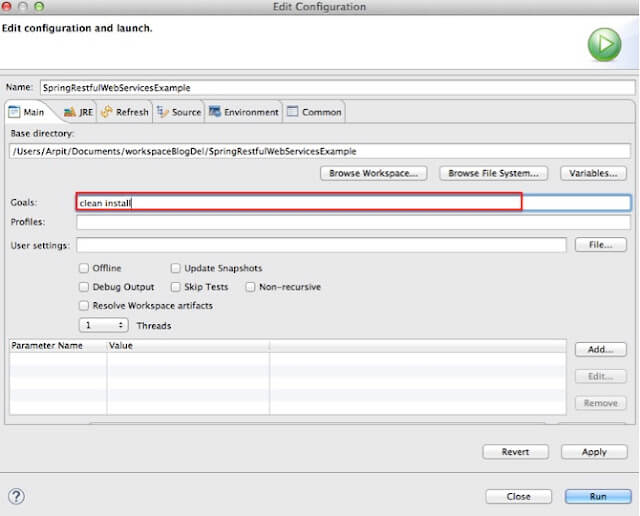
6) It ‘s time to do maven build.

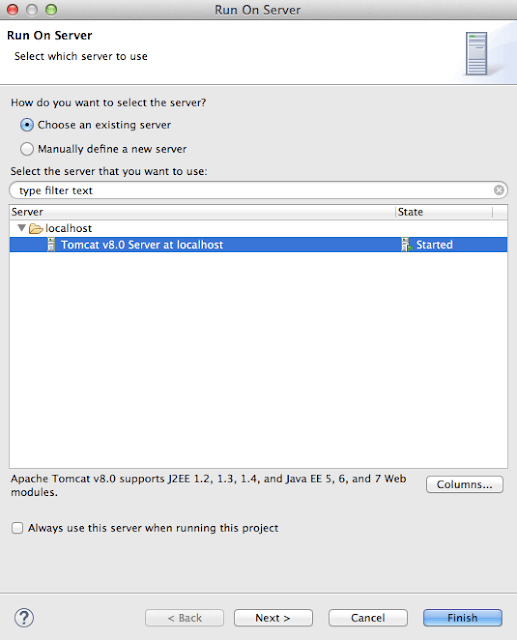
Run the application
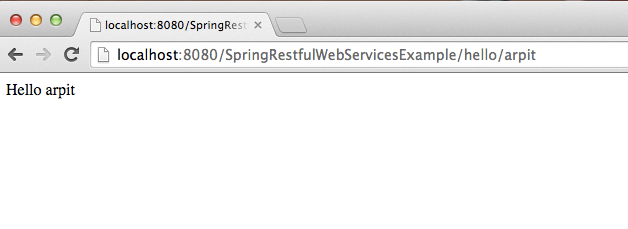
You will get following output:
That’s all about Spring Restful web services example.

Hi, your post is good, but why only Hello World example as its so simple.
Post some credential like from front-end application to connect to database and records gets reflected.
Regards,
Devesh A
WARNING: No mapping found for HTTP request with URI [/SpringRestfulWebServicesExample/hello/arpit] in DispatcherServlet with name 'springrest'
I am getting this above warning with Http status 404 Error
try to change your src/main/resources folder to src/main/java .it worked for me