
- Introduction to web services
- Web services interview questions
- SOAP web service introduction
- RESTful web service introduction
- Difference between SOAP and REST web services
- SOAP web service example in java using eclipse
- JAX-WS web service eclipse tutorial
- JAX-WS web service deployment on tomcat
- Create RESTful web service in java(JAX-RS) using jersey
- RESTful web service
- JAXRS json example using jersey
- RESTful web service
- JAXRS CRUD example using jersey
- AngularJS RESTful web service
- JAXRS CRUD example using $http
- RESTful Web Services (JAX-RS) @QueryParam Example
- Spring Rest simple example
- Spring Rest json example
- Spring Rest xml example
- Spring Rest CRUD example
In previous post, we have used @PathParam for passing parameter to URL in RESTful Web Services json example and we have directly passed parameter values but JAXRS @QueryParam can be used to pass query parameters. In case of @QueryParam, we pass parameters as well as its values.
For example: http://localhost:8080/JAXRSJsonExample/rest/countries/country?id=3&countryName=Nepal
Here Parameter names are id,countryName and its values are 3,Nepal respectively.
@QueryParam can be used in case of filtering . When you want show both param as well value in url.
For example: Lets say you are showing list of customers on a website and you can show 10 at a time. When user click next , he will see next 10 customers, so in this case, we can use @QueryParam may look something like this
http://localhost:8080/JAXRSJsonExample/rest/listOfCustomers?start=10&size=10
1) Follow steps on RESTful Web Services json example to create simple RESTful web services which uses @PathParam.
2) Change CountryRestService.java to use @QueryParam as below.
package org.arpit.java2blog.jaxrs;

import java.util.ArrayList;
import java.util.List;

import javax.ws.rs.GET;
import javax.ws.rs.Path;
import javax.ws.rs.Produces;
import javax.ws.rs.QueryParam;
import javax.ws.rs.core.MediaType;

import org.arpit.java2blog.bean.Country;
/*
 * author: Arpit Mandliya
 * */
@Path("/countries")
public class CountryRestService {

 @GET
 @Produces(MediaType.APPLICATION_JSON)
 public List getCountries()
 {
 List listOfCountries = new ArrayList();
 listOfCountries=createCountryList();
 return listOfCountries;
 }

 @GET
 @Path("/country")
 @Produces(MediaType.APPLICATION_JSON)
 public Country getCountryById(@QueryParam("id") int id,@QueryParam("countryName") String countryName)
 {
 List listOfCountries = new ArrayList();
 listOfCountries=createCountryList();

 for (Country country: listOfCountries) {
 if(country.getId()==id && country.getCountryName().equalsIgnoreCase(countryName))
 return country;
 }

 return null;
 }

// Utiliy method to create country list.
 public List createCountryList()
 {
 Country indiaCountry=new Country(1, "India");
 Country chinaCountry=new Country(4, "China");
 Country nepalCountry=new Country(3, "Nepal");
 Country bhutanCountry=new Country(2, "Bhutan");

 List listOfCountries = new ArrayList();
 listOfCountries.add(indiaCountry);
 listOfCountries.add(chinaCountry);
 listOfCountries.add(nepalCountry);
 listOfCountries.add(bhutanCountry);
 return listOfCountries;
 }
}
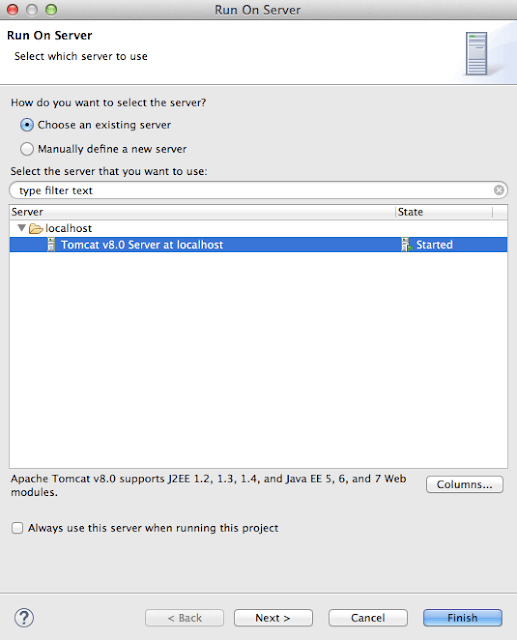
That’s all. We need to run the application now.
Run the application
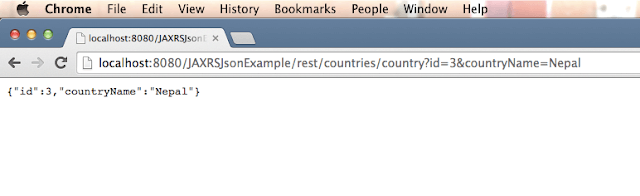
We are done with Restful web services json QueryParam example. If you are still facing any issue, please comment.

Good explanation.