
- Introduction to web services
- Web services interview questions
- SOAP web service introduction
- RESTful web service introduction
- Difference between SOAP and REST web services
- SOAP web service example in java using eclipse
- JAX-WS web service eclipse tutorial
- JAX-WS web service deployment on tomcat
- Create RESTful web service in java(JAX-RS) using jersey
- RESTful web service
- JAXRS json example using jersey
- RESTful web service JAXRS CRUD example using jersey
- AngularJS RESTful web service
- JAXRS CRUD example using $http
- RESTful Web Services (JAX-RS) @QueryParam Example
- Spring Rest simple example
- Spring Rest json example
- Spring Rest xml example
- Spring Rest CRUD example
In previous post, we have created a very simple Restful web services(JAXRS) using jersey which returns xml. In this post, we will see Restful web services(JAXRS) using jersey which will return json as response.
Here are steps to create a simple Restful web services(JAXRS) using jersey which will return json.
1) Create a dynamic web project using maven in eclipse named “JAXRSJsonExample”
 <dependency>
   <groupId>com.sun.jersey</groupId>
   <artifactId>jersey-servlet</artifactId>
   <version>${jersey.version}</version>
 </dependency>
 <dependency>
   <groupId>com.sun.jersey</groupId>
   <artifactId>jersey-json</artifactId>
   <version>${jersey.version}</version>
 </dependency>
Now create pom.xml as follows:
pom.xml
<project xmlns="http://maven.apache.org/POM/4.0.0" xmlns:xsi="http://www.w3.org/2001/XMLSchema-instance"
 xsi:schemaLocation="http://maven.apache.org/POM/4.0.0 http://maven.apache.org/maven-v4_0_0.xsd">
 <modelVersion>4.0.0</modelVersion>
 <groupId>com.arpit.java2blog</groupId>
 <artifactId>JAXRSJsonExample</artifactId>
 <packaging>war</packaging>
 <version>0.0.1-SNAPSHOT</version>
 <name>JAXRSJsonExample Maven Webapp</name>
 <url>http://maven.apache.org</url>
   <properties>
        <jersey.version>1.18.3</jersey.version>
    </properties>
 <dependencies>
  <dependency>
   <groupId>junit</groupId>
   <artifactId>junit</artifactId>
   <version>3.8.1</version>
   <scope>test</scope>
  </dependency>

  <dependency>
   <groupId>com.sun.jersey</groupId>
   <artifactId>jersey-servlet</artifactId>
   <version>${jersey.version}</version>
  </dependency>
  <dependency>
   <groupId>com.sun.jersey</groupId>
   <artifactId>jersey-json</artifactId>
   <version>${jersey.version}</version>
  </dependency>

  <dependency>
   <groupId>commons-logging</groupId>
   <artifactId>commons-logging</artifactId>
   <version>1.2</version>
  </dependency>
 </dependencies>
 <build>
  <finalName>JAXRSJsonExample</finalName>
  <plugins>
   <plugin>
    <groupId>org.apache.maven.plugins</groupId>
    <artifactId>maven-compiler-plugin</artifactId>
    <version>3.3</version>
    <configuration>
     <source>1.7</source>
     <target>1.7</target>
    </configuration>
   </plugin>
   <plugin>
    <groupId>org.apache.maven.plugins</groupId>
    <artifactId>maven-war-plugin</artifactId>
    <configuration>
     <failOnMissingWebXml>false</failOnMissingWebXml>
    </configuration>

   </plugin>
  </plugins>
 </build>

</project>
Application configuration:
3) create web.xml as below:
<web-app xmlns="http://java.sun.com/xml/ns/javaee" xmlns:xsi="http://www.w3.org/2001/XMLSchema-instance"
    xsi:schemaLocation="http://java.sun.com/xml/ns/javaee
          http://java.sun.com/xml/ns/javaee/web-app_3_0.xsd"
    version="3.0">
  <display-name>Archetype Created Web Application</display-name>
  <servlet>
        <servlet-name>jersey-serlvet</servlet-name>
        <servlet-class>com.sun.jersey.spi.container.servlet.ServletContainer</servlet-class>
        <init-param>
          <param-name>com.sun.jersey.api.json.POJOMappingFeature</param-name>
          <param-value>true</param-value>
        </init-param>
        <load-on-startup>1</load-on-startup>
  </servlet>

  <servlet-mapping>
        <servlet-name>jersey-serlvet</servlet-name>
        <url-pattern>/rest/*</url-pattern>
  </servlet-mapping>
</web-app>
Create bean class
4) Create a bean name “Country.java” in org.arpit.java2blog.bean.
package org.arpit.java2blog.bean;

public class Country{

 int id;
 String countryName;

 public Country(int i, String countryName) {
 super();
 this.id = i;
 this.countryName = countryName;
 }
 public int getId() {
 return id;
 }
 public void setId(int id) {
 this.id = id;
 }
 public String getCountryName() {
 return countryName;
 }
 public void setCountryName(String countryName) {
 this.countryName = countryName;
 }

}
Create CountryRestService
5) Create a controller named “CountryRestService.java”
package org.arpit.java2blog.jaxrs;

import java.util.ArrayList;
import java.util.List;

import javax.ws.rs.GET;
import javax.ws.rs.Path;
import javax.ws.rs.PathParam;
import javax.ws.rs.Produces;
import javax.ws.rs.core.MediaType;

import org.arpit.java2blog.bean.Country;
/*
 * author: Arpit Mandliya
 * */
@Path("/countries")
public class CountryRestService {

    @GET
    @Produces(MediaType.APPLICATION_JSON)
 public List getCountries()
 {
  List listOfCountries = new ArrayList();
  listOfCountries=createCountryList();
  return listOfCountries;
 }

 @GET
    @Path("{id: d+}")
    @Produces(MediaType.APPLICATION_JSON)
 public Country getCountryById(@PathParam("id") int id)
 {
  List listOfCountries = new ArrayList();
  listOfCountries=createCountryList();

  for (Country country: listOfCountries) {
   if(country.getId()==id)
    return country;
  }

  return null;
 }

// Utiliy method to create country list.
 public List createCountryList()
 {
  Country indiaCountry=new Country(1, "India");
  Country chinaCountry=new Country(4, "China");
  Country nepalCountry=new Country(3, "Nepal");
  Country bhutanCountry=new Country(2, "Bhutan");

  List listOfCountries = new ArrayList();
  listOfCountries.add(indiaCountry);
  listOfCountries.add(chinaCountry);
  listOfCountries.add(nepalCountry);
  listOfCountries.add(bhutanCountry);
  return listOfCountries;
 }
}
@Path(/your_path_at_class_level) : Sets the path to base URL + /your_path_at_class_level. The base URL is based on your application name, the servlet and the URL pattern from the web.xml” configuration file.
@Path(/your_path_at_method_level): Sets path to base URL + /your_path_at_class_level+ /your_path_at_method_level
@Produces(MediaType.APPLICATION_JSON[, more-types ]): @Produces defines which MIME type is delivered by a method annotated with @GET. In the example text (“text/json”) is produced.
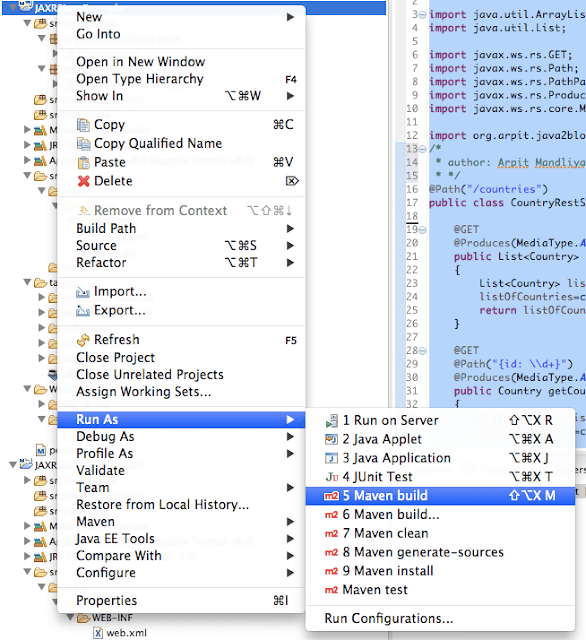
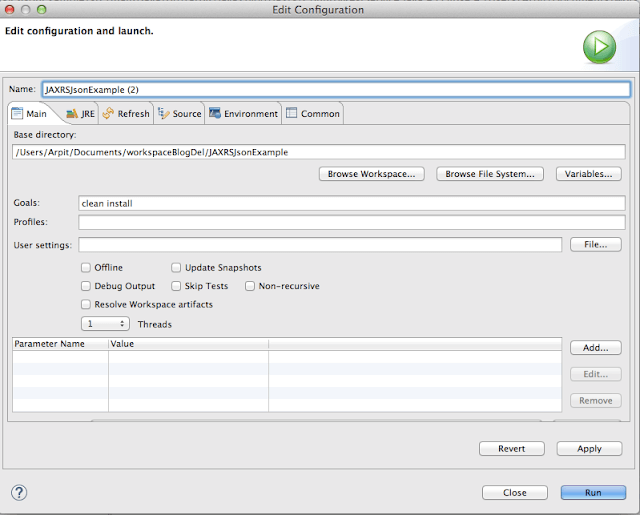
6) It ‘s time to do maven build.
Right click on project -> Run as -> Maven build
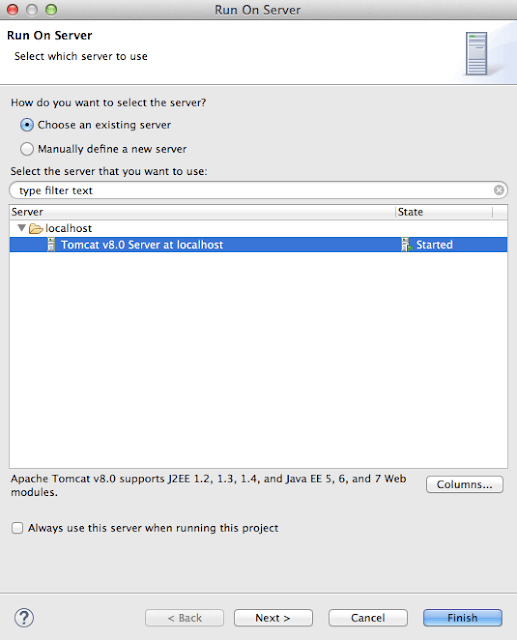
Run the application
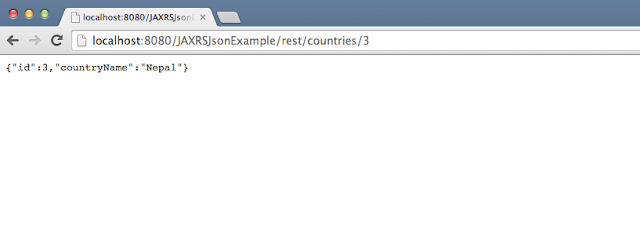
You will get following output:
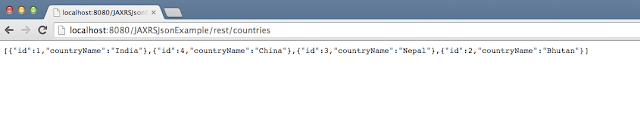
“http://localhost:8080/JAXRSJsonExample/rest/countries/3”.
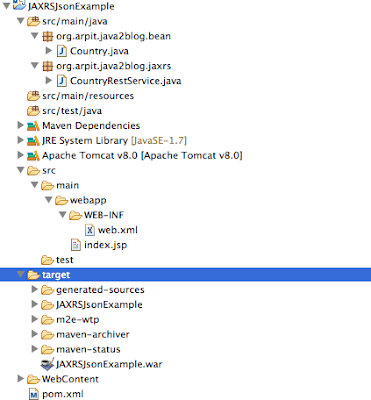
Project structure:
We are done with Restful web services json example using jersey. If you are still facing any issue, please comment.

Is it possible to create RESTful Webservices which return JSON data without using Maven?
Yes, It is possible.
You can go to maven central repository – http://search.maven.org/ – and for each of the listed dependencies search for their associated versions. When you find them in the repository there will be a link to allow you to download the jar file manually.
Once you have them downloaded locally you just set your classpath to their location when you run the program .
Let me know if you require more help on it.
Its possible. You have to download the jar files and add the classpath.
pls provide short answers
Hi Arpit,
It's very nice tutorial.
have one doubt how you got src.main.java package, i am able to see only resources package only and bit confused while creating Country class with in that. Please help.
Hi Sruthi,
Thank you. I have followed Maven folder structure. If you don't find src/main/java , you can create it manually.
It's working Arpit. Thank you.