
In this post , we will see how to use ModelMap in Spring MVC.
Spring MVC tutorial:
- Spring MVC hello world example
- Spring MVC Hibernate MySQL example
- Spring MVC interceptor example
- Spring MVC angularjs example
- Spring MVC @RequestMapping example
- Spring Component,Service, Repository and Controller example
- Spring MVC @ModelAttribute annotation example
- Spring MVC @RestController annotation example
- Spring MultiActionController Example
- Spring MVC ModelMap
- Spring MVC file upload example
- Spring restful web service example
- Spring restful web service json example
- Spring Restful web services CRUD example
- Spring security hello world example
- Spring security cus
ModelMap object is used to pass multiple values from Spring MVC controller to JSP .
Some basics about Spring MVC ModelMap class:
- ModelMap class subclasses LinkedHashMap. It add some methods for convenience.
- It provides addAttribute method to put key value pair. This method return ModelMap objects that can be used for chaining.
- ModelMap uses
- ModelMap checks for null values.
Example:
Prerequisite:
You need to create spring mvc hello world example first.
Once you are done with spring mvc sample project. We need to add or modify following files.
- Make changes to HelloWorldController.java
- Modify index.jsp
- Modify hello.jsp
Thats all we need to do to demonstrate Spring MultiActionController example.
1) change HelloWorldController.java as below
package org.arpit.java2blog.springmvc.controller;

import org.springframework.stereotype.Controller;
import org.springframework.ui.ModelMap;
import org.springframework.web.bind.annotation.RequestMapping;

@Controller
public class HelloWorldController {

 @RequestMapping("/helloworld")
 public String hello(ModelMap map) {

  String helloWorldMessage = "Hello world from java2blog!";
  String welcomeMessage = "Welcome to  java2blog!";
  map.addAttribute("helloMessage", helloWorldMessage);
  map.addAttribute("welcomeMessage", welcomeMessage);

  return "hello";
 }
}
We have added two attributes to ModelMap and they will be used in jsp with helloMessage and welcomeMessage
2) Modify index.jsp
<%@ page language="java" contentType="text/html; charset=UTF-8" pageEncoding="UTF-8"%>HelloWorld Click here to read hello and welcome message
3)Modify hello.jsp in /WEB_INF folder.
<%@ page language="java" contentType="text/html; charset=UTF-8"
    pageEncoding="UTF-8"%>


Hello


${helloMessage}


${welcomeMessage}
4) It ‘s time to do maven build.
Right click on project -> Run as -> Maven build

5) Provide goals as clean install (given below) and click on run
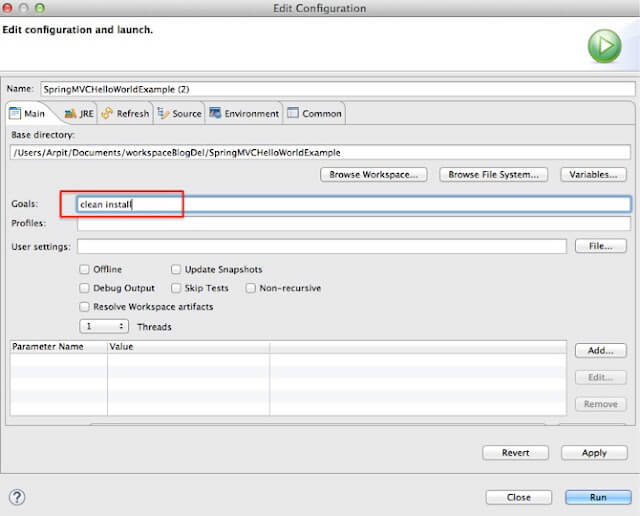
Run the application
6) Right click on project -> run as -> run on server
Select apache tomcat and click on finish
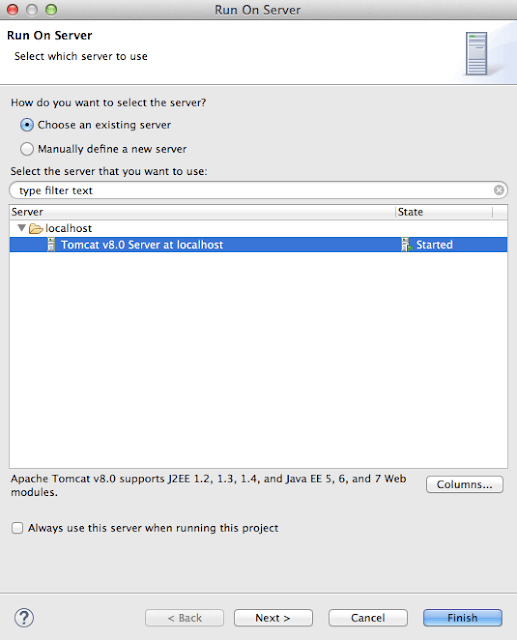
7) You will see below screen:
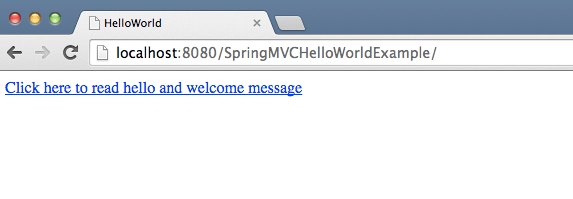
When you click on link, you will get below screen
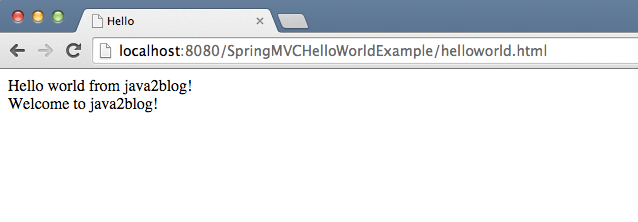
We are done with Spring MVC ModelMap example. If you are still facing any issue, please comment.

message is not displaying in my case