
In this post, we will see how to read object from file in java. In last post, we have already seen how to write object to a file and created employee.ser , now in this post, we are going to read same file and retrieve back Employee object.
Java Serialization Tutorial:
- Serialization in javaJava
- Serialization interview questions and answers
- serialversionuid in java serialization
- externalizable in java
- Transient keyword in java
- Difference between Serializable and Externalizable in Java
Steos for reading object from file are:
Reading object from file using ObjectInputStream may be referred as Deserialization.
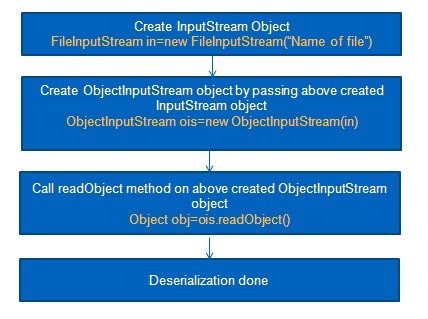
Lets take an example:
Create Employee.java same as last example in src->org.arpit.java2blog
Create Employee.java same as last example in src->org.arpit.java2blog
1.Employee.java
package org.arpit.java2blog;
import java.io.Serializable;
public class Employee implements Serializable{
   private static final long serialVersionUID = 1L;
  int employeeId;
    String employeeName;
    String department;

    public int getEmployeeId() {
        return employeeId;
    }
    public void setEmployeeId(int employeeId) {
        this.employeeId = employeeId;
    }
    public String getEmployeeName() {
        return employeeName;
    }
    public void setEmployeeName(String employeeName) {
        this.employeeName = employeeName;
    }
    public String getDepartment() {
        return department;
    }
    public void setDepartment(String department) {
        this.department = department;
    }
}
Create DeserializeMain.java in src->org.arpit.java2blog
2.DeserializeMain.java
package org.arpit.java2blog;
import java.io.IOException;
import java.io.ObjectInputStream;

public class DeserializeMain {
 /**
  * @author Arpit Mandliya
  */
 public static void main(String[] args) {

  Employee emp = null;
       try
       {
          FileInputStream fileIn =new FileInputStream("employee.ser");
          ObjectInputStream in = new ObjectInputStream(fileIn);
          emp = (Employee) in.readObject();
          in.close();
          fileIn.close();
       }catch(IOException i)
       {
          i.printStackTrace();
          return;
       }catch(ClassNotFoundException c)
       {
          System.out.println("Employee class not found");
          c.printStackTrace();
          return;
       }
       System.out.println("Deserialized Employee...");
       System.out.println("Emp id: " + emp.getEmployeeId());
       System.out.println("Name: " + emp.getEmployeeName());
       System.out.println("Department: " + emp.getDepartment());
 }
}
3.Run it:
When you run above DeserializeMain.java and you will get following output:
Deserialized Employee...
Emp id: 101
Name: Arpit
Department: CS
These are some simple steps to read object from file. If you want to go through some complex scenario you can go through Serialization in java
