
Web service Tutorial Content:
- Introduction to web services
- Web services interview questions
- SOAP web service introduction
- RESTful web service introduction
- Difference between SOAP and REST web services
- SOAP web service example in java using eclipse
- JAX-WS web service eclipse tutorial
- JAX-WS web service deployment on tomcat
- Create RESTful web service in java(JAX-RS) using jersey
- RESTful web service JAXRS json example using jersey
- RESTful web service JAXRS CRUD example using jersey
- AngularJS RESTful web service
- JAXRS CRUD example using $http
- RESTful Web Services (JAX-RS) @QueryParam Example
- Spring Rest simple example
- Spring Rest json example
- Spring Rest xml example
- Spring Rest CRUD example
In previous post, we have already seen Spring Restful web services which returns json as response.In this post, we will extend same example and create Restful web services which will provide CRUD(Create, read, update and delete) operation example.If you want complete integration with hibernate and mysql, you can go through Spring Restful hibernate mysql example.
We will use following annotations for CRUD operation.
|
Method
|
Description
|
|
Get
|
It is used to read resource
|
|
Post
|
It is used to create new resource.
It is not idempotent method |
|
Put
|
It is generally used to update resource.It is idempotent method
|
|
Delete
|
It is used to delete resource
|
Idempotent means result of multiple successful request will not change state of resource after initial application
For example :
Delete is idempotent method because when you first time use delete, it will delete the resource (initial application) but after that, all other request will have no result because resource is already deleted.
Post is not idempotent method because when you use post to create resource , it will keep creating resource for each new request, so result of multiple successful request will not be same.
Source code:
Maven dependencies
2) We need to add Jackson json utility in the classpath.
<dependency>
            <groupId>com.fasterxml.jackson.core</groupId>
            <artifactId>jackson-databind</artifactId>
             <version>2.4.1</version>
 </dependency>
Now change pom.xml as follows:
pom.xml
<project xmlns="http://maven.apache.org/POM/4.0.0" xmlns:xsi="http://www.w3.org/2001/XMLSchema-instance"
  xsi:schemaLocation="http://maven.apache.org/POM/4.0.0 http://maven.apache.org/maven-v4_0_0.xsd">
  <modelVersion>4.0.0</modelVersion>
  <groupId>com.arpit.java2blog</groupId>
  <artifactId>SpringRestfulWebServicesWithJSONExample</artifactId>
  <packaging>war</packaging>
  <version>0.0.1-SNAPSHOT</version>
  <name>SpringRestfulWebServicesWithJSONExample Maven Webapp</name>
  <url>http://maven.apache.org</url>
  <dependencies>
    <dependency>
      <groupId>junit</groupId>
      <artifactId>junit</artifactId>
      <version>3.8.1</version>
      <scope>test</scope>
    </dependency>
    <dependency>
   <groupId>javax.servlet</groupId>
   <artifactId>javax.servlet-api</artifactId>
   <version>3.1.0</version>
  </dependency>

  <dependency>
   <groupId>org.springframework</groupId>
   <artifactId>spring-core</artifactId>
   <version>${spring.version}</version>
  </dependency>
  <dependency>
   <groupId>org.springframework</groupId>
   <artifactId>spring-webmvc</artifactId>
   <version>${spring.version}</version>
  </dependency>
   <dependency>
            <groupId>com.fasterxml.jackson.core</groupId>
            <artifactId>jackson-databind</artifactId>
             <version>2.4.1</version>
        </dependency>
 </dependencies>
 <build>
  <finalName>SpringRestfulWebServicesWithJSONExample</finalName>

  <plugins>
   <plugin>
    <groupId>org.apache.maven.plugins</groupId>
    <artifactId>maven-compiler-plugin</artifactId>
    <version>3.1</version>
    <configuration>
     <source>${jdk.version}</source>
     <target>${jdk.version}</target>
    </configuration>
   </plugin>
  </plugins>

 </build>
 <properties>
  <spring.version>4.2.1.RELEASE</spring.version>
  <jdk.version>1.7</jdk.version>
 </properties>
</project>
Spring application configuration:
3) Change web.xml as below:
<!DOCTYPE web-app PUBLIC
 "-//Sun Microsystems, Inc.//DTD Web Application 2.3//EN"
 "http://java.sun.com/dtd/web-app_2_3.dtd" >

<web-app>
  <display-name>Archetype Created Web Application</display-name>
  <servlet>
 <servlet-name>springrest</servlet-name>
 <servlet-class>
  org.springframework.web.servlet.DispatcherServlet
 </servlet-class>
 <load-on-startup>1</load-on-startup>
</servlet>

<servlet-mapping>
 <servlet-name>springrest</servlet-name>
 <url-pattern>/</url-pattern>
</servlet-mapping>
</web-app>
4) create a xml file named springrest-servlet.xml in /WEB-INF/ folder.
Please change context:component-scan if you want to use different package for spring to search for controller.Please refer to spring mvc hello world example for more understanding.
<beans xmlns="http://www.springframework.org/schema/beans"
 xmlns:context="http://www.springframework.org/schema/context"
 xmlns:mvc="http://www.springframework.org/schema/mvc" xmlns:xsi="http://www.w3.org/2001/XMLSchema-instance"
 xsi:schemaLocation=" http://www.springframework.org/schema/beans http://www.springframework.org/schema/beans/spring-beans-3.0.xsd http://www.springframework.org/schema/context
        http://www.springframework.org/schema/context/spring-context-3.0.xsd http://www.springframework.org/schema/mvc http://www.springframework.org/schema/mvc/spring-mvc-3.0.xsd">

 <mvc:annotation-driven/>
<context:component-scan base-package="org.arpit.java2blog.controller" />

</beans>
Create bean class
4) Create a bean name “Country.java” in org.arpit.java2blog.bean.
package org.arpit.java2blog.bean;

public class Country{

    int id;
    String countryName;
    long population;

    public Country() {
        super();
    }
    public Country(int i, String countryName,long population) {
        super();
        this.id = i;
        this.countryName = countryName;
        this.population=population;
    }
    public int getId() {
        return id;
    }
    public void setId(int id) {
        this.id = id;
    }
    public String getCountryName() {
        return countryName;
    }
    public void setCountryName(String countryName) {
        this.countryName = countryName;
    }
    public long getPopulation() {
        return population;
    }
    public void setPopulation(long population) {
        this.population = population;
    }

}
Create Controller
5) Create a controller named “CountryController.java” in package org.arpit.java2blog.controller
package org.arpit.java2blog.controller;

import java.util.List;
import org.arpit.java2blog.bean.Country;
import org.arpit.java2blog.service.CountryService;
import org.springframework.web.bind.annotation.PathVariable;
import org.springframework.web.bind.annotation.RequestBody;
import org.springframework.web.bind.annotation.RequestMapping;
import org.springframework.web.bind.annotation.RequestMethod;
import org.springframework.web.bind.annotation.RestController;

@RestController
public class CountryController {

    CountryService countryService = new CountryService();

    @RequestMapping(value = "/countries", method = RequestMethod.GET, headers = "Accept=application/json")
    public List getCountries() {
        List listOfCountries = countryService.getAllCountries();
        return listOfCountries;
    }

    @RequestMapping(value = "/country/{id}", method = RequestMethod.GET, headers = "Accept=application/json")
    public Country getCountryById(@PathVariable int id) {
        return countryService.getCountry(id);
    }

    @RequestMapping(value = "/countries", method = RequestMethod.POST, headers = "Accept=application/json")
    public Country addCountry(@RequestBody Country country) {
        return countryService.addCountry(country);
    }

    @RequestMapping(value = "/countries", method = RequestMethod.PUT, headers = "Accept=application/json")
    public Country updateCountry(@RequestBody Country country) {
        return countryService.updateCountry(country);

    }

    @RequestMapping(value = "/country/{id}", method = RequestMethod.DELETE, headers = "Accept=application/json")
    public void deleteCountry(@PathVariable("id") int id) {
        countryService.deleteCountry(id);

    }
}
Create Service class
It is just a helper class which should be replaced by database implementation. It is not very well written class, it is just used for demonstration.
import java.util.ArrayList;
import java.util.HashMap;
import java.util.List;

import org.arpit.java2blog.bean.Country;

/*
 * It is just a helper class which should be replaced by database implementation.
 * It is not very well written class, it is just used for demonstration.
 */
public class CountryService {

    static HashMap<Integer,Country> countryIdMap=getCountryIdMap();

    public CountryService() {
        super();

        if(countryIdMap==null)
        {
            countryIdMap=new HashMap<Integer,Country>();
            // Creating some objects of Country while initializing
            Country indiaCountry=new Country(1, "India",10000);
            Country chinaCountry=new Country(4, "China",20000);
            Country nepalCountry=new Country(3, "Nepal",8000);
            Country bhutanCountry=new Country(2, "Bhutan",7000);

            countryIdMap.put(1,indiaCountry);
            countryIdMap.put(4,chinaCountry);
            countryIdMap.put(3,nepalCountry);
            countryIdMap.put(2,bhutanCountry);
        }
    }

    public List getAllCountries()
    {
        List countries = new ArrayList(countryIdMap.values());
        return countries;
    }

    public Country getCountry(int id)
    {
        Country country= countryIdMap.get(id);
        return country;
    }
    public Country addCountry(Country country)
    {
        country.setId(getMaxId()+1);
        countryIdMap.put(country.getId(), country);
        return country;
    }

    public Country updateCountry(Country country)
    {
        if(country.getId()<=0)
            return null;
        countryIdMap.put(country.getId(), country);
        return country;

    }
    public void deleteCountry(int id)
    {
        countryIdMap.remove(id);
    }

    public static HashMap<Integer, Country> getCountryIdMap() {
        return countryIdMap;
    }

    // Utility method to get max id
    public static int getMaxId()
    { int max=0;
    for (int id:countryIdMap.keySet()) {
        if(max<=id)
            max=id;

    }
    return max;
    }
}
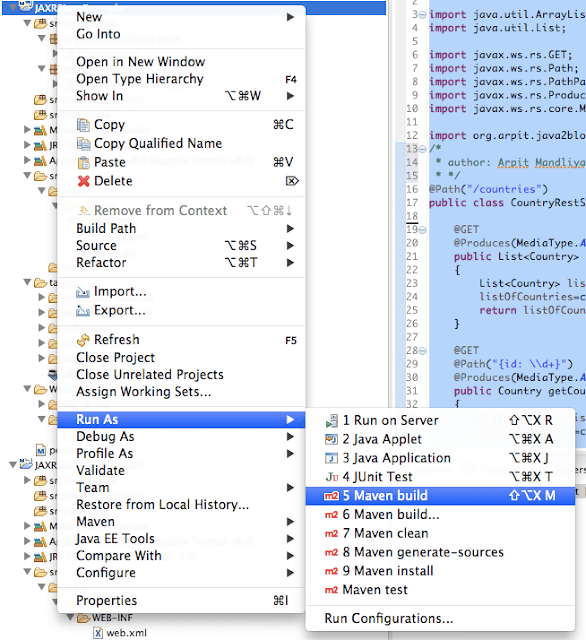
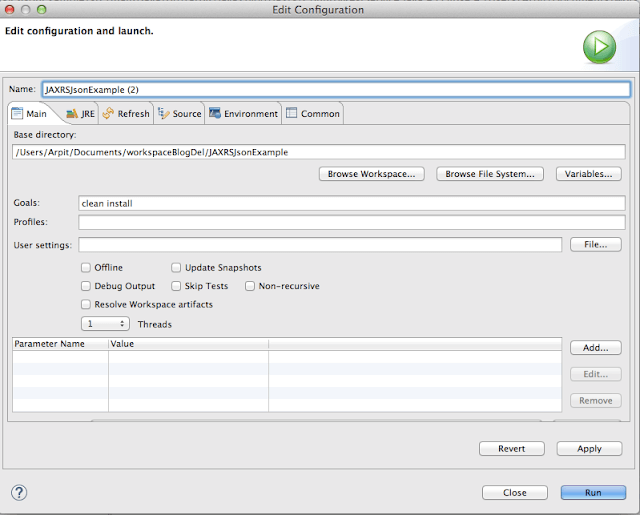
7) It ‘s time to do maven build.
Right click on project -> Run as -> Maven build
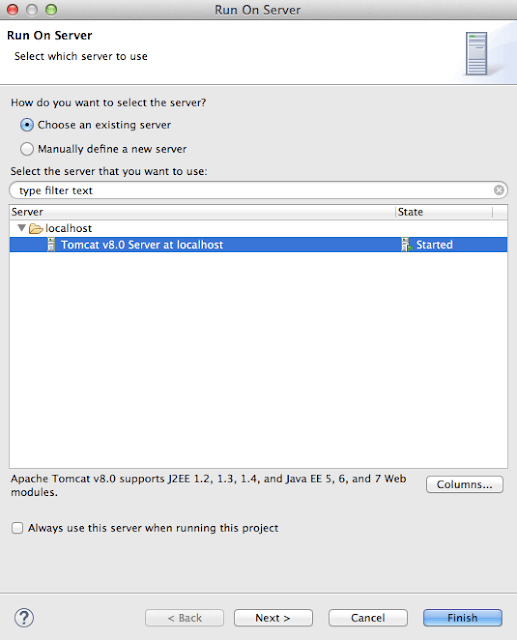
Run the application
10) We will test this application in postman , UI based client for testing restful web applications. It is chrome plugin. Launch postman.If you want java based client, then you can also use how to send get or post request in java.
Get method
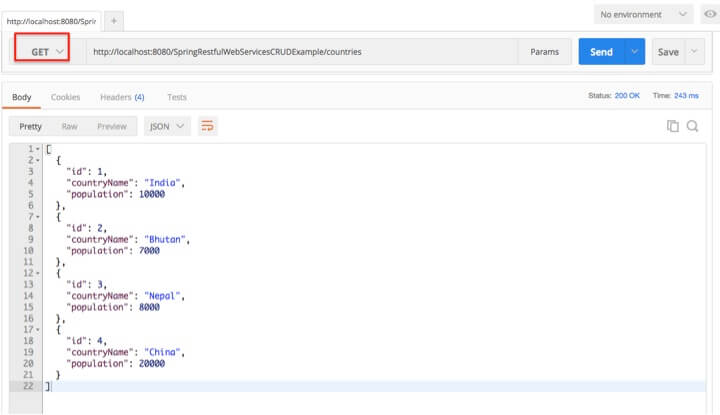
11) Test your get method Spring REST service
URL :“http://localhost:8080/SpringRestfulWebServicesCRUDExample/countries”.
You will get following output:
Post method
12) Post method is used to create new resource. Here we are adding new Country England to country list, so you can see we have used new country json in post body.
URL: “http://localhost:8080/SpringRestfulWebServicesCRUDExample/countries”.
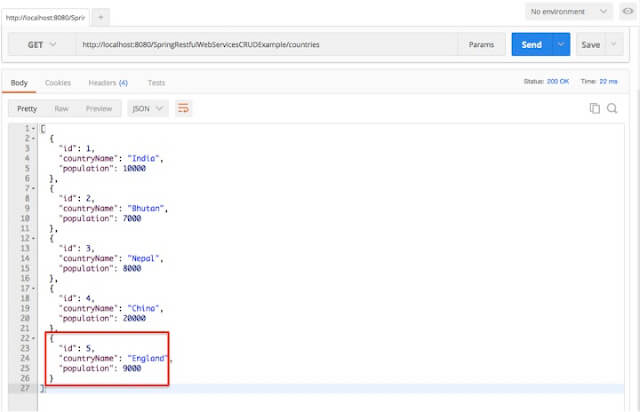
Use get method to check if above country have been added to country list.
Put Method
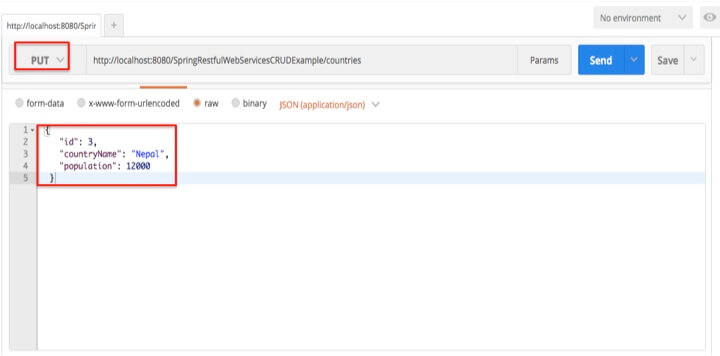
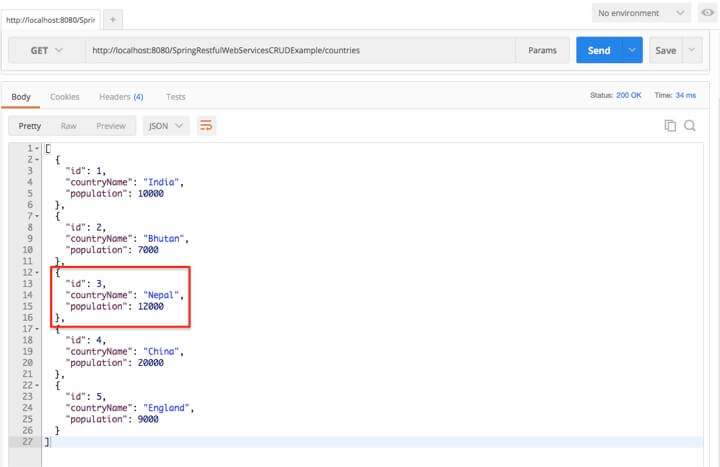
13) Put method is used to update resource. Here will update population of nepal using put method.
We will update country json in body of request.
URL : “http://localhost:8080/SpringRestfulWebServicesCRUDExample/countries”
Use get method to check population of nepal.
Delete method
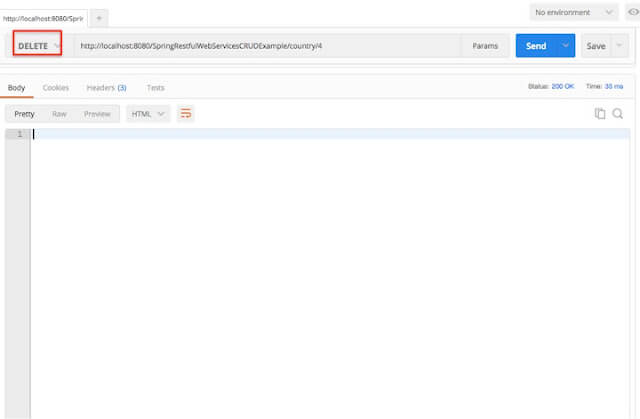
14) Delete method is used to delete resource.We will pass id of country which needs to be deleted as PathParam. We are going delete id:4 i.e. china to demonstrate delete method.
URL : “http://localhost:8080/SpringRestfulWebServicesCRUDExample/country/4”
Use get method to check country list.
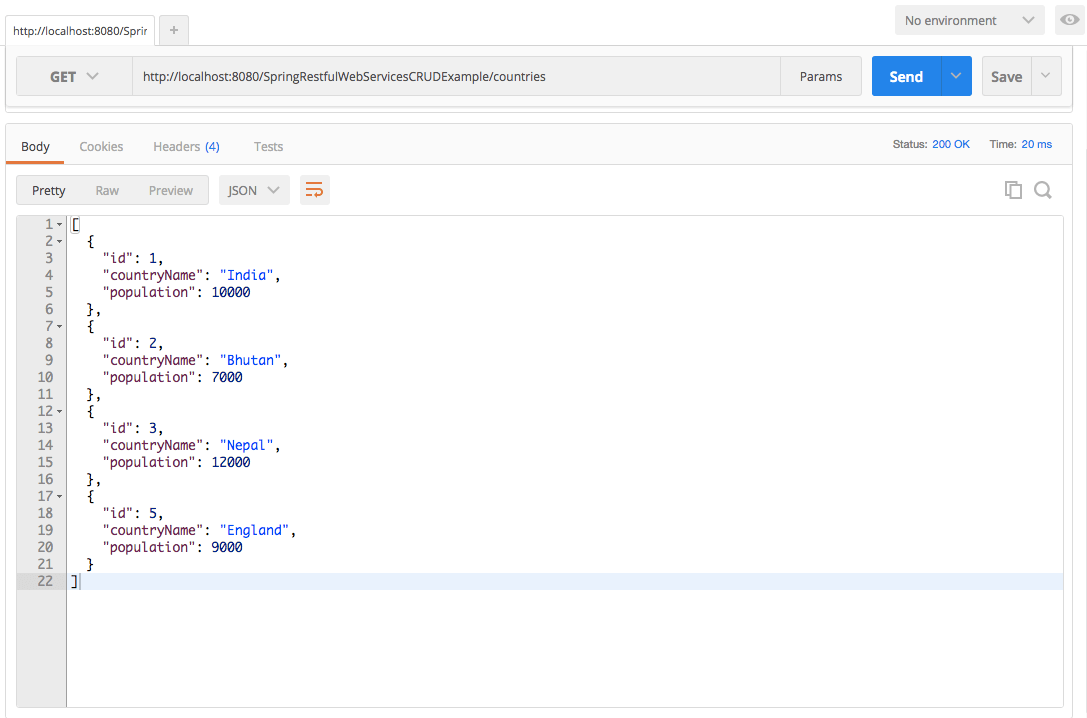
As you can see, we have deleted country with id 4 i.e. china
Project structure:
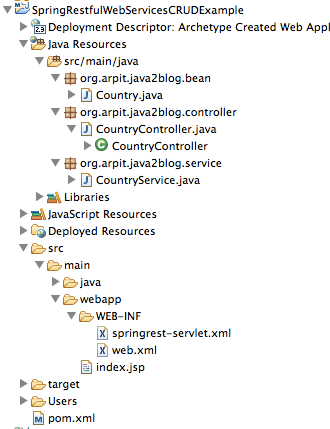
We are done with Spring Restful web services json CRUD example. If you are still facing any issue, please comment.

Perfect! Awesome! Thank you sooo much!!
Hi,
Great work !!!
Really helpfull
super…
simply great tutorial …
thanks 🙂
Nice 🙂
Awesome example thanks for sharing this example to us its helps alot to me….thanks onces again
Thank you sooo much