
In this post, we will see about AngularJS inbuilt filter examples.
AngularJS tutorial:
We need to display output data in some other formats many times . For example: You need to display currency with the number. AngularJS provides many inbuilt filter for this purpose.
AngularJS filters are used to format data in views. “|” symbol is used to apply filter.
AngularJS filter can be applied in two ways
AngularJS filters are used to format data in views. “|” symbol is used to apply filter.
AngularJS filter can be applied in two ways
- On AngularJS directives
- On AngularJS expressions
Lets see some of inbuilt filters here.
Filter on expressions
uppercase
This filter is used to change format of text to uppercase.
Angular js {{java2blogMsg|uppercase}} !!!
Output: HELLO FROM JAVA2BLOG !!!
lowercase
This filter is used to change format of text to lowercase.
Angular js {{java2blogMsg|lowercase}} !!!
Output:hello from java2blog !!!
currency
This filter is used to format number into currency.
Angular js Cost is {{cost|currency}}
Output:Cost is $500.00
limitTo
limitTo is used to display limited number of charcters
Angular js {{java2blogMsg | limitTo:5}} !!!
Output:
Hello !!!
date
Date is used to format dates in specific formats
Angular js Today 's date : {{date | date:'dd/MM/yyyy'}}
Output:Today ‘s date : 02/04/2016
Filter on directives
orderby
This filter is use to order by column in the table.
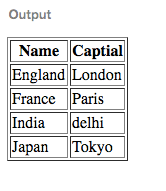
Angular js
Name Captial {{ con.name }} {{ con.capital }}
Output:
Filter:
It is used to filter data from array or list
Angular js Filter :
Name Captial {{ con.name }} {{ con.capital }}
Output:
AngularJS filter example
