
If you want to practice data structure and algorithm programs, you can go through 100+ java coding interview questions.
[toc]
In previous post, we have seen breadth-first search(bfs). In this post, we will see how to implement depth-first search(DFS) in java.
Graph traversal Algorithms
In DFS, You start with an un-visited node and start picking an adjacent node, until you have no choice, then you backtrack until you have another choice to pick a node, if not, you select another un-visited node.
DFS can be implemented in two ways.
- Recursive
- Iterative
Iterative
Let see with the help of example:
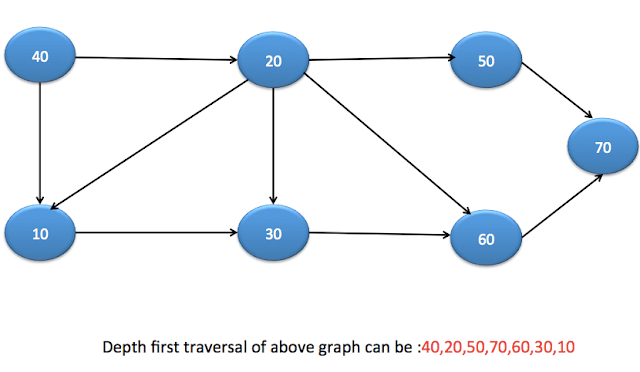
We start with node 40. It then visits node 20, node 50, node 70 respectively as they are directly connected. After that, it backtracks to node 20 and visited node 60, node 30 and node 10 respectively.
    // Iterative DFS using stack
    public  void dfsUsingStack(Node node)
    {
        Stack<Node> stack=new  Stack<Node>();
        stack.add(node);
        while (!stack.isEmpty())
        {
            Node element=stack.pop();
            if(!element.visited)
            {
                System.out.print(element.data + " ");
                element.visited=true;
            }

            List<Node> neighbours=element.getNeighbours();
            for (int i = 0; i < neighbours.size(); i++) {
                Node n=neighbours.get(i);
                if(n!=null && !n.visited)
                {
                    stack.add(n);
                }
            }
        }
    }
Recursive
// Recursive DFS
    public  void dfs(Node node)
    {
        System.out.print(node.data + " ");
        List neighbours=node.getNeighbours();
        node.visited=true;
        for (int i = 0; i < neighbours.size(); i++) {
            Node n=neighbours.get(i);
            if(n!=null && !n.visited)
            {
                dfs(n);
            }
        }
    }
Java DFS Example
There are two ways to represent a graph.
-
- Using Neighbours list
- Using Adjacency Matrix
Using Neighbours list
In this, you can have List<Node> as neighbours in Node class as below.
static class Node
    {
        int data;
        boolean visited;
        List<Node> neighbours;

        Node(int data)
        {
            this.data=data;
            this.neighbours=new ArrayList<>();

        }
        public void addneighbours(Node neighbourNode)
        {
            this.neighbours.add(neighbourNode);
        }
        public List getNeighbours() {
            return neighbours;
        }
        public void setNeighbours(List neighbours) {
            this.neighbours = neighbours;
        }
    }
Here is the complete java program for DFS implementation for iterative as well as recursive method.
package org.arpit.java2blog;
import java.util.ArrayList;
import java.util.List;
import java.util.Stack;

public class DepthFirstSearchExampleNeighbourList
{

    static class Node
    {
        int data;
        boolean visited;
        List<Node> neighbours;

        Node(int data)
        {
            this.data=data;
            this.neighbours=new ArrayList<>();

        }
        public void addneighbours(Node neighbourNode)
        {
            this.neighbours.add(neighbourNode);
        }
        public List<Node> getNeighbours() {
            return neighbours;
        }
        public void setNeighbours(List<Node> neighbours) {
            this.neighbours = neighbours;
        }
    }

    // Recursive DFS
    public  void dfs(Node node)
    {
        System.out.print(node.data + " ");
        List<Node> neighbours=node.getNeighbours();
        node.visited=true;
        for (int i = 0; i < neighbours.size(); i++) {
            Node n=neighbours.get(i);
            if(n!=null && !n.visited)
            {
                dfs(n);
            }
        }
    }

    // Iterative DFS using stack
    public  void dfsUsingStack(Node node)
    {
        Stack<Node> stack=new  Stack<Node>();
        stack.add(node);
        while (!stack.isEmpty())
        {
            Node element=stack.pop();
            if(!element.visited)
            {
                System.out.print(element.data + " ");
                element.visited=true;
            }

            List<Node> neighbours=element.getNeighbours();
            for (int i = 0; i < neighbours.size(); i++) {
                Node n=neighbours.get(i);
                if(n!=null && !n.visited)
                {
                    stack.add(n);
                }
            }
        }
    }

    public static void main(String arg[])
    {

        Node node40 =new Node(40);
        Node node10 =new Node(10);
        Node node20 =new Node(20);
        Node node30 =new Node(30);
        Node node60 =new Node(60);
        Node node50 =new Node(50);
        Node node70 =new Node(70);

        node40.addneighbours(node10);
        node40.addneighbours(node20);
        node10.addneighbours(node30);
        node20.addneighbours(node10);
        node20.addneighbours(node30);
        node20.addneighbours(node60);
        node20.addneighbours(node50);
        node30.addneighbours(node60);
        node60.addneighbours(node70);
        node50.addneighbours(node70);

        DepthFirstSearchExampleNeighbourList dfsExample = new DepthFirstSearchExampleNeighbourList();

        System.out.println("The DFS traversal of the graph using stack ");
        dfsExample.dfsUsingStack(node40);

        System.out.println();

        // Resetting the visited flag for nodes
        node40.visited=false;
        node10.visited=false;
        node20.visited=false;
        node30.visited=false;
        node60.visited=false;
        node50.visited=false;
        node70.visited=false;

        System.out.println("The DFS traversal of the graph using recursion ");
        dfsExample.dfs(node40);
    }
}
When you run above program, you will get below output
The DFS traversal of the graph using stack
40 20 50 70 60 30 10
The DFS traversal of the graph using recursion
40 10 30 60 70 20 50
Using Adjacency Matrix
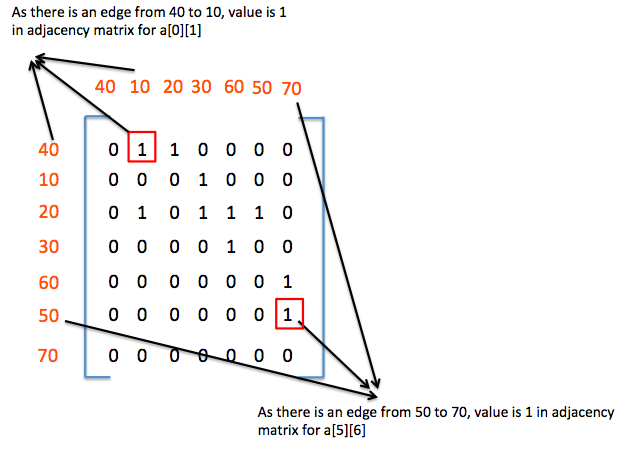
Adjacency_matrix is used to find the connection between two nodes.
if adjacency_matrix[i][j]==1, then nodes at index i and index j are connected
Below diagram will help you to understand adjacency matrix.
Create DepthFirstSearchExample.java
package org.arpit.java2blog.graph;

import java.util.ArrayList;
import java.util.Stack;

public class DepthFirstSearchExample
{

    static ArrayList<Node> nodes=new ArrayList<>();
    static class Node
    {
        int data;
        boolean visited;

        Node(int data)
        {
            this.data=data;

        }
    }

    // find neighbors of node using adjacency matrix
    // if adjacency_matrix[i][j]==1, then nodes at index i and index j are connected
    public ArrayList<Node> findNeighbours(int adjacency_matrix[][],Node x)
    {
        int nodeIndex=-1;

        ArrayList<Node> neighbours=new ArrayList<>();
        for (int i = 0; i < nodes.size(); i++) {
            if(nodes.get(i).equals(x))
            {
                nodeIndex=i;
                break;
            }
        }

        if(nodeIndex!=-1)
        {
            for (int j = 0; j < adjacency_matrix[nodeIndex].length; j++) {
                if(adjacency_matrix[nodeIndex][j]==1)
                {
                    neighbours.add(nodes.get(j));
                }
            }
        }
        return neighbours;
    }

    // Recursive DFS
    public  void dfs(int adjacency_matrix[][], Node node)
    {

        System.out.print(node.data + " ");
        ArrayList<Node> neighbours=findNeighbours(adjacency_matrix,node);
        node.visited=true;
        for (int i = 0; i < neighbours.size(); i++) {
            Node n=neighbours.get(i);
            if(n!=null && !n.visited)
            {
                dfs(adjacency_matrix,n);
            }
        }
    }

        // Iterative DFS using stack
    public  void dfsUsingStack(int adjacency_matrix[][], Node node)
    {
        Stack
When you run above program, you will get below output
The DFS traversal of the graph using stack
40 20 50 70 60 30 10
The DFS traversal of the graph using recursion
40 10 30 60 70 20 50
Please go through data structure and algorithm interview programs for more such programs.

oh, so easy to understand, thanks!